
How to Charge iJoy Vape
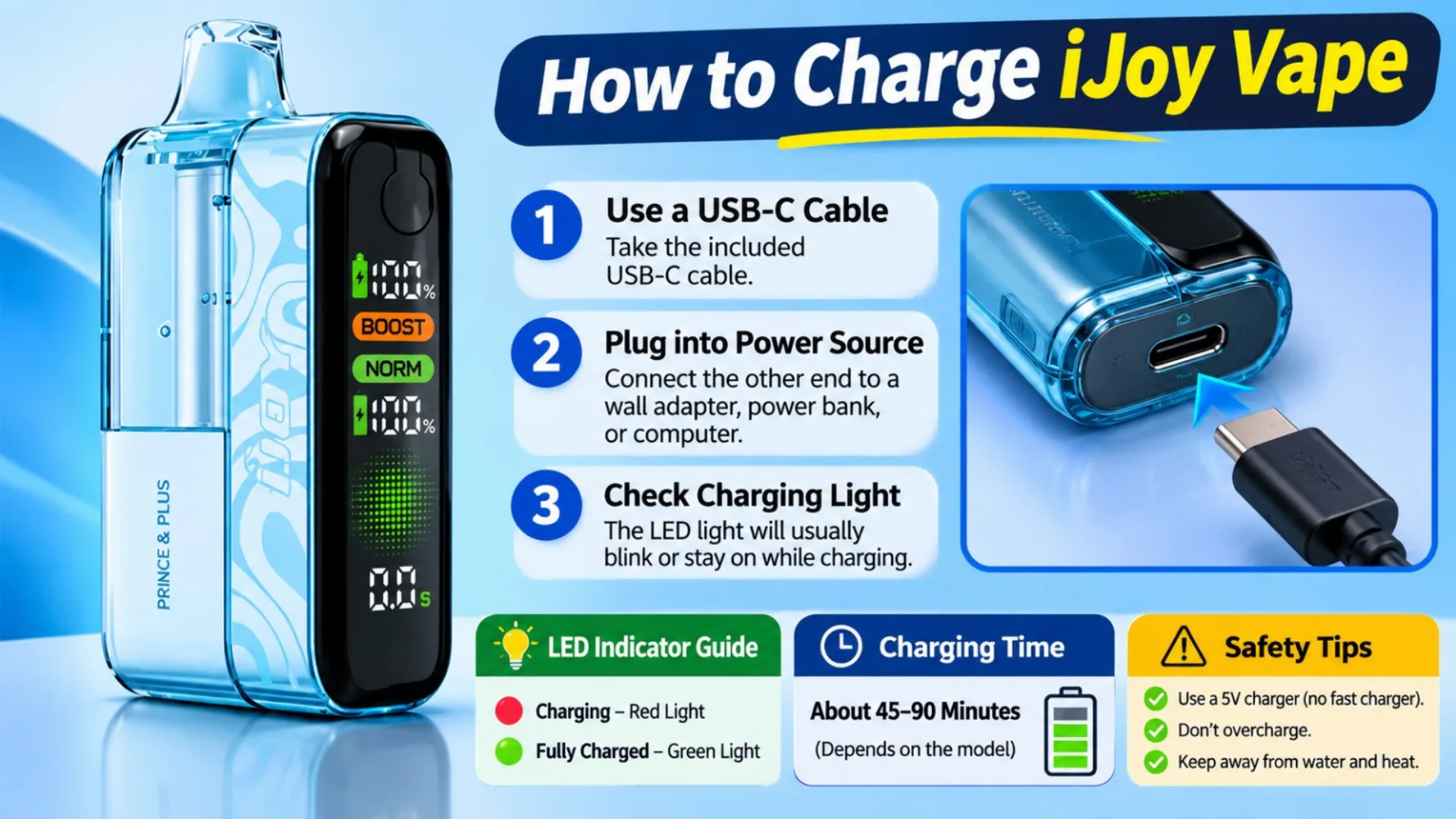
How to charge ijoy vape correctly depends on the exact iJOY model and its charging system. Most rechargeable iJOY vapes use a built-in battery and a dedicated charging port, while newer models such as the iJOY XP100K use USB-C charging as part of a larger rechargeable system. The right method is simple, but the charger, cable, port, and charging surface all matter.
A rechargeable iJOY vape should be charged according to its model-specific instructions rather than treated like a phone or generic electronic device. This guide covers the charging port, cable connection, battery indicators, expected charging behavior, common problems, and practical safety checks so you can identify what to do before, during, and after charging.
Does Every iJOY Vape Need Charging?
Not, every iJOY product uses the same battery design. Some iJOY models are disposable and sealed, while rechargeable models include a battery that can be charged through a USB port. The important distinction is whether the specific product is designed for recharging. A vape that has a USB charging port can be rechargeable, but the presence of a charging connection does not mean every model should be charged with the same cable, power source, or method.
Rechargeable vs Sealed iJOY Models
A rechargeable iJOY vape is designed to accept electrical power through its charging system. A sealed, non-rechargeable model does not have a user-accessible charging system and should not be modified to add one. For example, the iJOY XP100K is a rechargeable pod-style system with USB-C charging. Independent product specifications list a 1500mAh battery system made up of a 300mAh pod battery and a 1200mAh power bank.
Check the Exact Model First
Before connecting a cable, look at the bottom or side of the iJOY vape for the charging port and model information. The product packaging or instructions should also identify whether the model is rechargeable and what charging method it uses. This matters because iJOY has released different product formats over time. The XP50000, for example, uses USB-C charging and a 1000mAh rechargeable battery, while the XP100K uses a different two-part battery configuration.
How to Charge iJoy Vape Correctly
The basic charging process is straightforward when the model is rechargeable. Start by checking the charging port, using the appropriate cable, connecting it to a suitable power source, and watching the battery indicator. Do not force the connector into the port. If the cable does not fit naturally, stop and check whether you have the correct cable for the specific iJOY model.
Step 1: Find the Charging Port
Locate the charging port on the vape. On many newer iJOY models, this is a USB-C connection positioned on the lower or side section of the product. Inspect the port before connecting the cable. It should be free from visible liquid, dirt, or physical damage. If the port looks damaged or wet, do not connect the charger until the issue has been addressed.
Step 2: Connect the Cable
Insert the correct charging cable into the port without applying excessive force. The connector should sit firmly without needing to be twisted, pushed sideways, or held at an unusual angle. If the model uses USB-C, use a suitable USB-C cable that fits securely. The XP100K is specifically listed with USB-C charging, making USB-C part of its standard charging design.
Step 3: Connect to the Power Source
Connect the other end to the power source recommended for the vape. Follow the charging instructions supplied with your particular iJOY model rather than assuming that any phone or tablet adapter is appropriate. FDA guidance recommends using the charger supplied with the device and following the manufacturer’s charging instructions. It also advises against leaving a vape charging unattended or overnight.
Step 4: Check the Battery Indicator
Once charging begins, check the screen or indicator light. Some iJOY models use a digital display, while simpler models may use an LED indicator to show charging status. The XP100K has a 2-inch smart display and provides battery information through its screen. This makes it easier to see the battery state while the device is connected to power.
Step 5: Disconnect When Charging Is Complete
When the battery reaches the charge level indicated by the model, disconnect the cable. Do not keep the vape connected simply because it is convenient. After removing the cable, inspect the port and cable for unusual heat, damage, or liquid. If the device behaves abnormally during charging, stop using it and follow the manufacturer’s support instructions.
How Long Does an iJOY Vape Take to Charge?
There is no single charging time for every iJOY vape. Battery capacity, charging circuitry, remaining battery level, cable, and power source all influence the time required. A smaller rechargeable iJOY vape may charge faster than a larger model, while a high-capacity system can require more time. The correct charging duration should therefore be based on the model’s charging indicator rather than an arbitrary number of minutes.
Battery Capacity Changes Charging Time
Battery capacity is usually expressed in milliamp-hours, or mAh. A higher-capacity battery generally stores more energy, although charging speed also depends on the charging system. The XP100K, for example, has a combined 1500mAh battery system consisting of a 300mAh pod battery and a 1200mAh power bank. Its USB-C charging system is therefore part of a larger power arrangement than a small single-battery vape.
Do Not Use a Fixed Time for Every Model
Avoid advice such as “charge every iJOY for exactly two hours.” That ignores differences between models. Instead, connect the correct charger and monitor the battery indicator. When the model shows that charging is complete, disconnect it rather than continuing to charge based on a preset timer.
How to Know When an iJOY Vape Is Fully Charged
The clearest sign of a full charge is the indicator provided by the specific model. Depending on the vape, this may be a full battery icon, a percentage reading, a change in LED behavior, or another charging-status indicator. Digital-display models can provide more precise information than basic LED systems. On the XP100K, the smart screen is designed to show battery information alongside other operating data.
Battery Percentage
If your iJOY vape displays a battery percentage, use that information as the main reference. A percentage reading makes it easier to tell whether the battery is nearly empty, partially charged, or ready for use. Do not assume that the battery percentage will behave exactly like a smartphone battery meter. The display is part of the vape’s own battery-management system and should be interpreted according to the model’s instructions.
LED Charging Indicators
Some iJOY products may use LED indicators instead of a percentage screen. The light may change color or behavior as charging progresses. Because indicator patterns vary by model, avoid applying the light codes from one iJOY vape to another. Check the instructions for the exact product you own.
How to Charge iJOY XP100K
The iJOY XP100K is a useful example because it combines a rechargeable power system with a refillable pod design. Independent specifications list a 1500mAh battery system, USB-C charging, a smart digital display, and dual operating modes. The charging process begins at the USB-C port. Connect the compatible USB-C cable, monitor the battery information on the screen, and disconnect the cable when the charging cycle is complete.
XP100K Battery System
The XP100K does not rely on a simple single-battery arrangement. Its listed configuration includes a 300mAh battery in the pod and a 1200mAh power bank, producing a combined 1500mAh system. This design is relevant when explaining charging because the pod and power bank are part of the same overall system. Users should follow the intended charging setup instead of attempting to charge individual internal batteries separately.
XP100K USB-C Charging
USB-C is the standard charging connection listed for the XP100K. This makes the charging port easy to identify compared with older proprietary connections. The important point is not simply having a USB-C cable. The cable should be connected to the vape’s intended charging port and used according to the product’s charging instructions.
Can You Charge an iJOY With a Phone Charger?
This is where generic charging advice can become misleading. A USB connector may physically fit without meaning that every power adapter is the correct choice for the vape. FDA guidance specifically recommends using the charger supplied with the device rather than a phone or tablet charger. It also recommends following the manufacturer’s instructions for use and care.
Use the Recommended Charging Setup
The safest approach is to use the charging cable and power source specified by the iJOY model’s instructions. If the product came with a cable or charging accessory, use that setup unless the manufacturer provides alternative specifications. Avoid choosing a charger simply because its connector fits. Electrical compatibility involves more than the physical shape of the plug.
Why the Cable Alone Is Not Enough
A USB-C connector identifies the physical connection type, not the complete charging requirements of the device.
That means two USB-C products can have different charging characteristics. For an iJOY vape, the model’s charging instructions should take priority over assumptions based on another USB-C electronic device.
Where Should You Charge an iJOY Vape?
Charging location matters because a vape contains a battery and should remain visible while connected to power. FDA recommends charging on a clean, flat surface away from materials that can easily catch fire.
A stable surface also prevents the vape from being pressed, covered, or accidentally knocked into a position where airflow around the charging area is restricted.
Use a Clear, Stable Surface
A desk, counter, or other clean and stable surface is preferable to a soft or cluttered location. Keep the charging area clear so you can see the vape while it is connected.
Avoid charging the vape under bedding, inside a bag, or on a surface where heat can build up around the device.
Keep It Away From Extreme Temperatures
FDA guidance advises protecting vape batteries from extreme temperatures and not charging them in very hot or very cold conditions. Do not leave a charging vape in direct sunlight or inside a hot vehicle. If the device has been exposed to extreme heat or cold, allow it to return to a normal environment before following the manufacturer’s charging instructions.
What If My iJOY Vape Is Not Charging?
A vape that does not charge can have several possible causes. The issue may involve the cable, power source, charging port, battery, or internal electronics. Start with simple external checks before assuming that the battery has failed. Never open the vape to inspect or repair its internal battery.
Check the Cable
Inspect the charging cable for cuts, damaged connectors, bent sections, or loose connections. If the cable is visibly damaged, stop using it. A cable that works with another device is not automatically guaranteed to be correct for the iJOY vape. Use the cable and charging arrangement recommended for your specific model.
Check the Charging Port
Look at the port for visible dirt, liquid, or physical damage. Do not push metal objects into the port to remove debris. If the port appears wet, damaged, or unusually loose, do not continue forcing the cable into it. Manufacturer support is the appropriate next step when the charging hardware itself appears defective.
Check the Power Source
If the vape does not respond, check whether the power source is functioning. A loose connection or unsuitable power source can prevent normal charging. Do not repeatedly reconnect a device that becomes unusually hot, smells abnormal, or shows signs of battery damage. Stop charging and follow the manufacturer’s support guidance.
Why Does My iJOY Get Hot While Charging?
A small amount of warmth can occur during charging, but unusual or rapidly increasing heat should not be ignored. The exact cause cannot be determined from temperature alone. If the vape becomes unusually hot, disconnect it from the charger and move away from the charging setup until the device has cooled. FDA identifies overheating, fires, and explosions as potential vape battery hazards and recommends following manufacturer charging guidance.
Stop Charging If the Battery Looks Damaged
Visible swelling, cracking, liquid exposure, severe heat, or other physical damage should not be treated as a normal charging condition. FDA advises replacing batteries if they are damaged or wet and says that devices with non-replaceable batteries that become damaged should be handled according to manufacturer guidance. Do not puncture, crush, open, or attempt to repair an internal lithium-ion battery. These components are not intended for improvised user repair.
Common iJOY Charging Mistakes
Charging problems often come from treating a vape like an ordinary USB gadget. A vape has a battery system designed around a particular product, so the manufacturer’s charging instructions should remain the starting point. The most common mistakes include using an unsuitable charger, charging unattended, covering the vape while charging, forcing a cable into the port, and continuing to charge a visibly damaged device.
Mistake: Charging Overnight
FDA specifically advises against charging a vape overnight or leaving it charging unattended. Instead, charge the vape when you can keep an eye on it and disconnect it after the charging cycle is complete.
Mistake: Using a Damaged Cable
A damaged cable can create an unreliable connection or other electrical problems. Do not tape over a damaged connector and continue using it as though it were new. Replace a damaged cable with the type recommended for your iJOY model.
Mistake: Covering the Vape While Charging
A vape should not be covered by clothing, bedding, paper, or other material while charging. FDA recommends adequate ventilation around charging equipment and warns against covering chargers in ways that reduce cooling. Keep the charging area open and visible instead.
How to Keep an iJOY Battery Working Properly
Good charging habits are mainly about consistency. Use the recommended charging setup, keep the port clean and dry, avoid extreme temperatures, and disconnect the vape when the charging cycle is complete. You do not need to create a complicated charging routine. The model’s own battery indicator and manufacturer instructions provide the most useful information about normal charging behavior.
Keep the Charging Port Dry
Liquid should never be intentionally introduced into the charging port. If the port becomes wet, do not connect the charger until it is appropriately dry. This is particularly important with refillable pod systems because e-liquid can be present around the pod area. Keep the refill process separate from the charging connection.
Store the Vape Properly
When the iJOY vape is not being used, keep it in a clean, dry place away from extreme heat and direct sunlight. Avoid storing it where the charging port or battery area can be exposed to liquid or physical pressure. For rechargeable products, proper storage supports the overall condition of the battery and charging hardware.
When Should You Stop Using an iJOY Vape?
A charging problem is not always a simple cable problem. If the device shows repeated abnormal behavior, physical battery damage, severe overheating, or other unusual signs, continuing to charge it is not appropriate. The FDA recommends understanding the manufacturer’s instructions, using recommended batteries, and paying attention to battery-related hazards.
Signs That Need Attention
A damaged charging port, damaged cable, unusual heat, visible battery damage, liquid exposure to internal areas, or repeated charging failure should be treated seriously. Do not open the casing to investigate the internal battery. For a sealed rechargeable vape, the practical solution is to contact the manufacturer or replace the product according to its support and disposal guidance.
Frequently Asked Questions
How to charge ijoy vape correctly?
Find the model’s designated charging port, use the recommended cable and power source, connect it without forcing the connector, monitor the battery indicator, and disconnect when charging is complete.
Can i charge an iJOY vape with any USB cable?
Not, necessarily. The cable should match the charging connection and the requirements of the specific model. A connector that physically fits does not automatically establish full charging compatibility.
Does iJOY XP100K use USB-C charging?
Yes, the iJOY XP100K is listed with USB-C charging and a 1500mAh two-part battery system consisting of a 300mAh pod battery and a 1200mAh power bank.
How long does an iJOY vape take to charge?
Charging time varies by model, battery capacity, remaining charge, and charging system. Use the battery indicator and model-specific instructions instead of relying on one fixed charging time.
Can i leave my iJOY vape charging overnight?
No, fDA guidance recommends not charging vape devices overnight or leaving them charging unattended.
Why is my iJOY vape not charging?
Check the recommended cable, charging connection, power source, and charging port. If the device still does not charge or shows signs of damage or unusual heat, stop using it and follow the manufacturer’s support guidance.
Why does my iJOY get hot while charging?
Some warmth can occur during charging, but unusual or rapidly increasing heat is not something to ignore. Disconnect the vape and stop charging if it becomes abnormally hot or shows other signs of battery trouble.
Can i charge an iJOY vape with a phone charger?
FDA guidance recommends using the charger supplied with the vape rather than a phone or tablet charger. Follow the charging instructions for your exact iJOY model.
Does rechargeable mean the iJOY vape can be refilled?
No, rechargeability describes the battery, while refillability describes the e-liquid system. Some iJOY models combine both features, while other rechargeable models may use a sealed e-liquid chamber.
What should i do if the charging port is damaged?
Do not force a cable into a damaged port or attempt to repair the internal connection yourself. Stop using the device and contact the manufacturer or replace it according to the product’s support guidance.
Conclusion
Knowing how to charge ijoy vape products correctly starts with identifying the exact model and following its intended charging system. Use the designated port, the recommended cable and power source, and the device’s own battery indicator. Keep the vape on a clean, stable surface while charging, avoid overnight or unattended charging, and stop if the device becomes unusually hot or appears damaged.
For iJOY models such as the XP100K, USB-C charging is built into the rechargeable system, while other iJOY products may have different specifications. Visit iJoy Vape Site to explore iJOY vape products and check the specifications for the exact model before charging or ordering.