
iJoy Vape How to Use: Setup, Settings & Tips
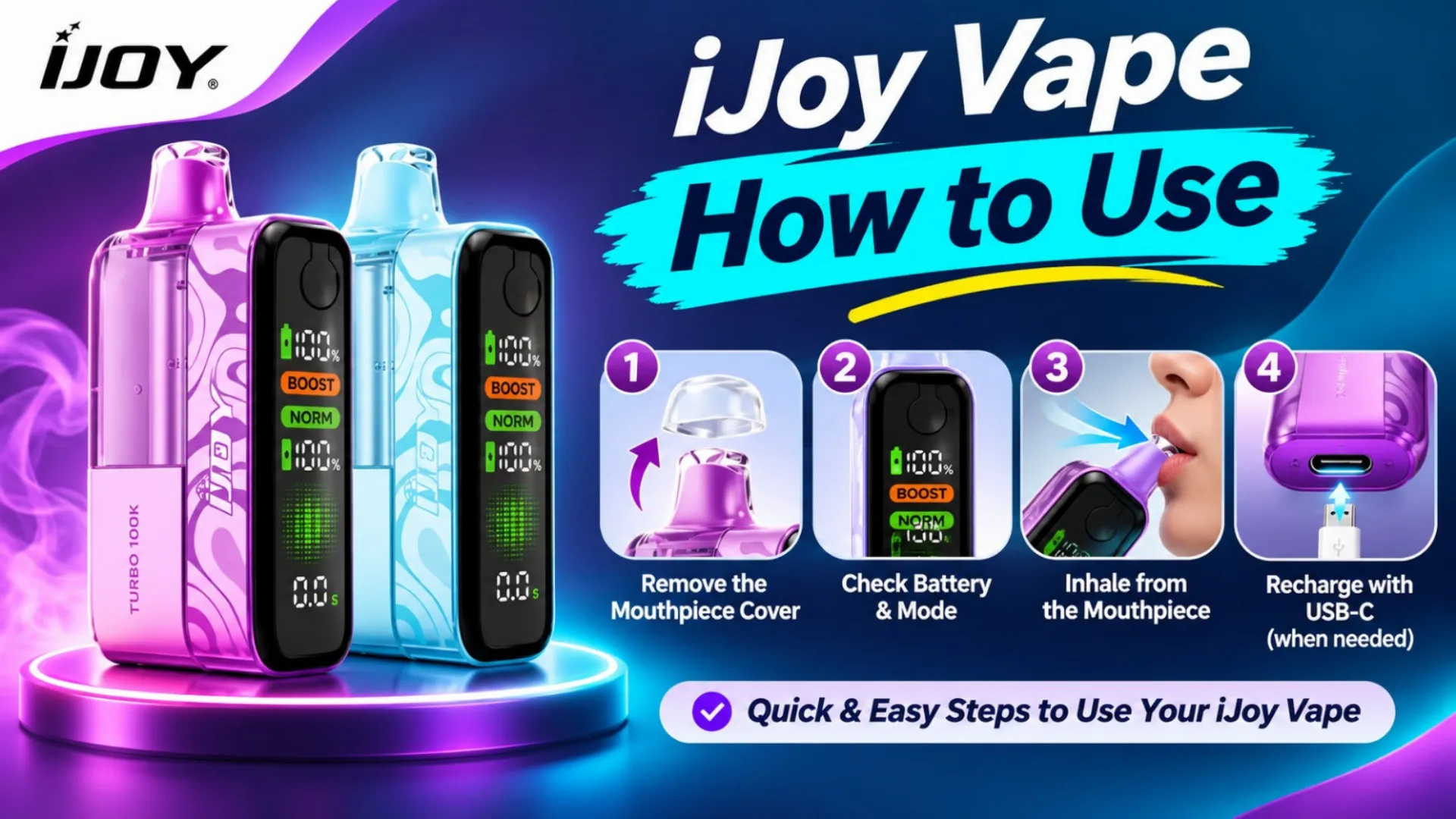
iJoy vape how to use depends on the specific iJOY model, because the brand makes both simple draw-activated disposables and more advanced kits with adjustable settings. For the IJOY XP100K Disposable Kit, using it involves checking the pod, taking a draw, adjusting airflow, selecting Normal or Boost mode, monitoring the digital screen, refilling when needed, and charging through USB-C. The XP100K is a refillable disposable-style kit rather than a basic sealed disposable.
What to Check Before Using an iJoy Vape
Before using an iJOY vape, identify the exact model and check whether it is prefilled, rechargeable, refillable, or draw activated. This matters because the operating method can differ significantly between models. IJOY’s official support section provides product manuals and usage information for its different devices.
For an XP100K kit, check that the pod is properly connected, the mouthpiece is clear, the e-liquid supply is available, and the device has sufficient battery power. The XP100K uses a 300mAh pod battery together with a 1200mAh power bank, giving the system a listed 1500mAh battery configuration.
How to Use an iJoy XP100K
Using the XP100K is straightforward because it uses draw-activated firing. Once the pod and power components are correctly assembled and the device has sufficient power, place the mouthpiece between your lips and take a steady draw. There is no need to press a traditional fire button for normal vaping.
The XP100K also includes adjustable airflow, allowing the draw to be changed according to preference. The device provides Normal and Boost modes, while its 2-inch digital screen displays useful operating information. For first use, starting with Normal Mode and a moderate airflow setting makes it easier to become familiar with the device. Once the airflow and vapor level feel suitable, the settings can be adjusted rather than changing several controls at the same time.
How the XP100K Draw Activation Works
The XP100K uses an automatic draw-activated system. This means the device detects the user’s inhale and activates the coil without requiring a firing button. This operation is different from some older IJOY devices that use a physical fire button. Take a smooth draw through the mouthpiece instead of repeatedly pulling very hard. If the device does not activate, check the battery level, pod connection, airflow path, and display before assuming that the coil or pod has failed.
The important point is that not every iJOY model operates in exactly the same way. Some older IJOY devices use button-controlled firing and multiple manual settings, so the model-specific manual should be followed when using a different device.
How to Adjust iJoy Vape Airflow
Airflow controls how much air enters the device while taking a draw. On an adjustable-airflow iJOY model such as the XP100K, moving the airflow control changes the character of the inhale. A more restricted setting creates a tighter draw, while a more open setting allows more air through the device. The XP100K’s adjustable airflow is designed to support different draw preferences, including tighter and more open inhalation styles.
For a new setup, make small airflow adjustments instead of moving immediately from fully closed to fully open. This makes it easier to identify the setting that provides the preferred balance of airflow and vapor.
How to Use Normal and Boost Mode
The XP100K has two power modes: Normal and Boost. The device is listed at approximately 22W in Normal Mode and up to 26W in Boost Mode, with the exact operating behavior controlled by the device’s internal system. Normal Mode is associated with the XP100K’s advertised up-to-100,000-puff rating. Boost Mode increases the output level and can produce more vapor, while also changing how quickly the device uses e-liquid and battery power.
If the goal is to understand how the Watermelon Ice or another XP100K flavor behaves, use one mode consistently for several draws before switching. This gives a clearer comparison between the two output levels.
How to Read the iJoy XP100K Display
The XP100K includes a 2-inch smart digital display that provides information about the device while it is being used. The screen is one of the main differences between this kit and simpler disposable vapes that rely only on a small indicator light. The display can show information such as battery status, operating mode, and e-liquid level. Checking the screen before vaping can help identify whether the device needs charging, whether the selected mode is correct, or whether the e-liquid supply needs attention.
This is particularly useful with the XP100K because the device is designed for extended use. Instead of estimating the remaining power or liquid, the screen provides a direct visual reference.
How to Use the XP100K Refill System
The XP100K is different from a sealed disposable because its e-liquid system is designed for refilling. The kit includes an 18mL prefilled pod and a separate 15mL refill bottle, giving a listed total of 33mL of e-liquid capacity. When the liquid level becomes low, the pod can be refilled through its designated refill system. Use the supplied refill bottle and add liquid carefully rather than filling beyond the intended capacity.
Keep the refill process controlled and avoid getting e-liquid into areas that are not designed to hold liquid. After refilling, make sure the relevant opening is properly closed and allow the liquid to settle before taking repeated draws. The refill process applies to the XP100K’s refillable pod component. It should not be treated as a general instruction for every iJOY disposable, because some iJOY models are sealed and are specifically designed to be discarded rather than refilled.
How to Charge an iJoy Vape
Charging instructions depend on the model. The XP100K uses USB Type-C charging and has a rechargeable battery system, so it can be connected to a compatible USB-C charging setup when the battery needs power. Before charging, inspect the cable and charging port for visible damage or liquid. Connect the USB-C cable properly and place the device on a stable surface while it charges.
Do not attempt to recharge a sealed iJOY model that is specifically designed as non-rechargeable. For example, IJOY’s documentation for the Q disposable states that the device cannot be refilled or recharged.
How to Know When an iJoy Vape Needs Attention
Changes in performance can indicate that the device needs a basic check. If an XP100K produces noticeably less vapor, does not activate, or shows a low battery indication, start with the display and basic connections before changing anything else. A low e-liquid level can also affect performance. On a refillable XP100K, check the liquid level before continuing to take repeated draws. If the pod is empty or nearly empty, refill it according to the device’s refill design.
If the device shows an error message, stops firing, becomes unusually hot, or appears damaged, stop using it and consult the appropriate IJOY support information or product manual. IJOY’s official FAQ specifically covers issues such as failure to fire, overheating, atomizer errors, and other device problems.
iJoy Vape Not Working: What to Check
When an iJOY vape does not work, the correct troubleshooting step depends on the model. For an XP100K, begin with the battery status and make sure the pod and power components are correctly positioned. Next, check whether the airflow path is blocked and whether the pod contains enough e-liquid. If the display is active but the device does not respond to a draw, inspect the pod connection and follow the model-specific troubleshooting instructions.
For older button-operated IJOY devices, the process can be different because some models require the fire button to be pressed while vaping. IJOY’s official FAQ and manuals therefore remain the best reference when the device is not an XP100K.
iJoy Vape Usage Issues: Causes and Solutions
Different symptoms point toward different parts of the device. A vape that does not activate may need charging or a connection check, while weak vapor can be related to the selected mode, airflow position, or e-liquid level.
| Issue | What to Check |
|---|---|
| Device does not activate | Battery, pod connection, airflow path |
| Weak vapor | Power mode, battery level, airflow |
| Low flavor output | E-liquid level, airflow, coil condition |
| Device needs charging | Battery indicator and USB-C connection |
| Screen shows an error | Stop using it and check the model manual |
| Unusual heat | Stop using the device and inspect for a problem |
| Low e-liquid | Refill the XP100K pod if applicable |
Avoid repeatedly forcing a device to operate when it shows an error or appears damaged. IJOY provides troubleshooting resources for issues involving firing, overheating, atomizer recognition, and other operating problems.
How to Use an iJoy Vape Correctly
Correct operation starts with knowing whether the specific iJOY device is draw activated or button operated. The XP100K uses draw activation, while other IJOY models may use physical controls, so copying instructions from one model to another can lead to incorrect operation.
For the XP100K, the basic routine is simple: check the pod and battery status, select the preferred mode, adjust airflow, take a steady draw, monitor the display, and refill or recharge when required. The kit’s design combines a refillable pod component with a separate power-bank system, so it should be treated differently from a small sealed disposable.
iJoy Vape FAQs
How do you use an iJoy vape?
First identify the exact iJOY model. On a draw-activated model such as the XP100K, make sure the pod is installed and charged, select the desired mode, adjust airflow, and inhale through the mouthpiece. Other iJOY models may use a fire button instead.
Do you press a button to use the iJOY XP100K?
No, the XP100K uses draw-activated firing, so it activates when you inhale through the mouthpiece.
How do you turn on an iJOY XP100K?
The XP100K is designed around draw activation rather than the traditional five-click firing method found on some older button-operated IJOY devices. Follow the specific XP100K instructions for its controls and display rather than applying instructions from another iJOY model.
Can you refill an iJOY vape?
It depends on the model. The XP100K is designed with a refillable pod system and includes an 18mL prefilled pod plus a 15mL refill bottle. Sealed iJOY disposable models should not be opened or refilled.
How do you change the airflow on an iJOY XP100K?
Use the adjustable airflow control on the XP100K to change the draw from more restricted to more open. Make small adjustments until the airflow matches your preferred draw.
What is Normal Mode on the XP100K?
Normal Mode is the lower output setting and is associated with the advertised up-to-100,000-puff rating. The XP100K also provides Boost Mode for higher output.
What does Boost Mode do on an iJOY XP100K?
Boost Mode raises the device’s output compared with Normal Mode. The XP100K is listed at up to 26W, while Normal Mode is approximately 22W. Higher output can increase vapor production and e-liquid consumption.
How do you charge an iJOY XP100K?
The XP100K uses USB Type-C charging. Connect a compatible USB-C cable to the charging port and monitor the device’s charging status.
Why is my iJOY vape not working?
Check the battery, pod connection, airflow path, e-liquid level, and display information. If the device shows an error, overheats, or appears damaged, stop using it and consult the relevant IJOY manual or support information.
Is every iJOY vape used the same way?
No, iJOY produces multiple device types, including button-operated kits, draw-activated devices, refillable systems, and sealed disposables. Always match the instructions to the exact model you have.
Conclusion
Learning iJoy vape how to use is mainly about identifying the exact model before following operating instructions. For the IJOY XP100K Disposable Kit, the process is straightforward: check the pod and battery, use draw activation, adjust airflow, select Normal or Boost mode, monitor the smart display, refill the pod when needed, and charge the rechargeable system through USB-C.
The key distinction is that an XP100K is not a basic sealed disposable. Its refillable pod component, separate power bank, adjustable airflow, dual output modes, and digital display give it a different operating process. For any other IJOY model, use its specific manual because controls and charging or refill capabilities can vary between devices.